Book
Submodule 19.2: Getting Started with Angular
Submodule 19.2: Getting Started with Angular
Completion requirements
View
- Installing Angular
- Installing Bootstrap
- Adding Font Awsome
- Testing Project
Installing Bootstrap
To install Bootstrap in our Angular application, open your Terminal, move to the angularChocoYourname angular-sub-folder, and run the command:
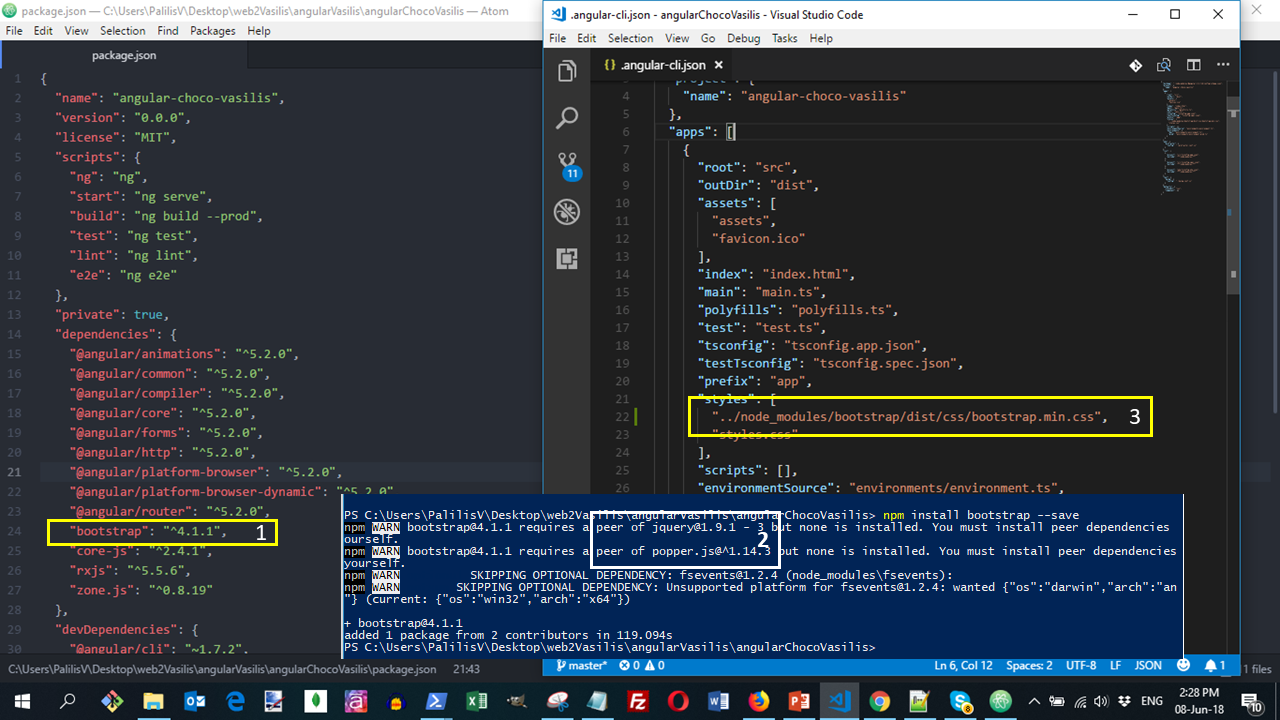
npm install bootstrap@4.1.1 --saveNote that:
- Using the
--saveoption the dependency will be saved inpackage.json(Image 1) - As npm informs us, we are not able to use the JavaScript-based Bootstrap classes because these need the jquery and popper libraries. We will solve this problem later. (Image 2)
Now that the project is set up it must be configured to include the bootstrap CSS.
- Open the file
angular-cli.jsonfrom the root of your project. - Inside
appslocate thestylesproperty. - This property allows external global styles to be applied to your application.
- Specify the path to bootstrap.min.css adding the code:
"../node_modules/bootstrap/dist/css/bootstrap.min.css",- It should look like the (Image 3) when you are done.